RCC · Recognition
Face recognition with privacy controls built in
Match faces against your watchlists in real time, search recorded video by photo, and verify identity at doors and visitor desks, with consent records, approvals and an audit trail on every use.
- Faces are found in the live streams by edge servers next to the cameras.
- Each face is compared with approved watchlists, at the threshold set for each list.
- Sensitive uses need a privacy officer’s countersign before an alert reaches operators.
Capabilities
What face recognition in RCC does
Enrolment and galleries
Enrol one person or thousands, organise galleries and keep one person database.
Watchlists with approvals
Thresholds, severity and an approval step for each watchlist.
Live match alerts
Matches reach the operator console and the incident queue with video attached.
Search and compare
Search recorded video by photo, and compare two faces one to one.
Attendance
Attendance from faces, with consent recorded for each person.
Face-verified entry
Confirm that the person at the door is the cardholder.
Visitor screening
Screen visitors at check-in, with a countersign for sensitive checks.
Privacy by design
Consent register, countersign, retention per gallery, data subject requests and a tamper-evident log of every search and match.
In the product
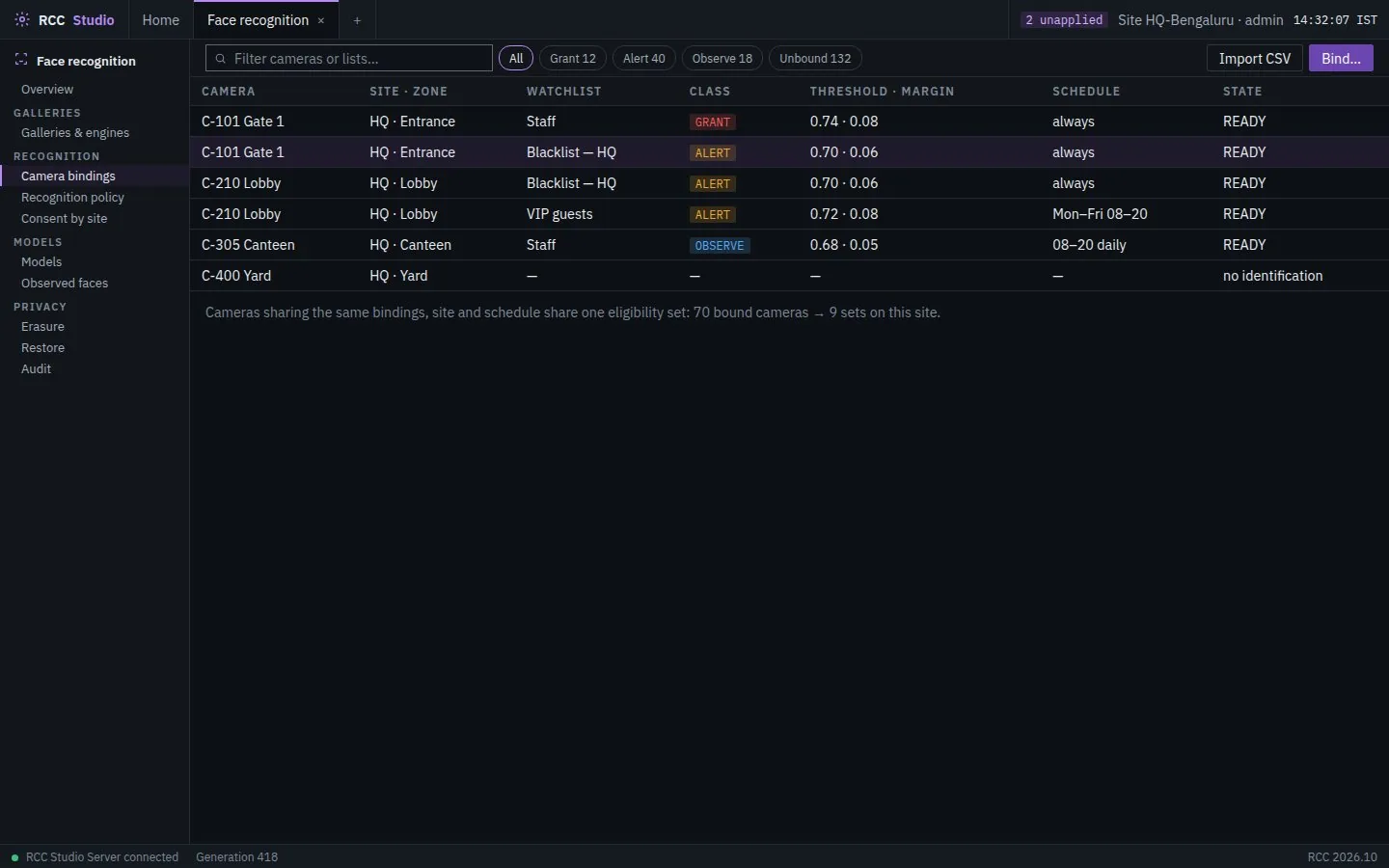
Watchlists bound to each camera
Bind a camera to the watchlists it checks, with a class of grant, alert or observe, a match threshold and margin, and a schedule. Consent, erasure and audit sit beside the bindings.
How it works
From enrolment to a confirmed match
Enrol
Add people to galleries, with consent recorded where required.
Detect
Edge servers find faces in the live streams.
Match
Faces are compared with approved watchlists.
Respond
A match opens an alert, an incident and its SOP.
Where it is used
Where face recognition is used
Campus safeguarding
Authorised pickups and a fast response when a child cannot be found.
Hospitals
Restricted wards, pharmacies and maternity units.
Industrial sites
Contractor checks at the gate and hazardous-area entry.
Public safety
Investigations across city cameras, under the agency’s control.
On the RCC platform
Stronger next to the rest of RCC
A watchlist match reaches the incident queue with its video attached, a face confirms the cardholder at the door, and every search is recorded in the same audit trail.
Questions
What buyers ask
Does face data leave our premises?
No. Matching runs on your own servers, on premises or air-gapped, and face data stays in your RCC deployment.
How is misuse prevented?
Watchlists need approval, sensitive searches need a privacy officer’s countersign, and every enrolment, search and match is kept in a tamper-evident log.
Can it run without RCC video management?
Yes. It runs on its own, and adds more value next to RCC video, access control and incident management.
Review the privacy controls with us
Tell us where you want to use face recognition and what your policy requires. We will show the consent, approval and retention controls before any match is made.